
Intro
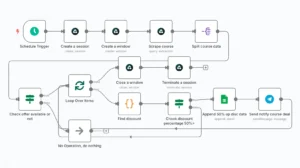
n8n chart
Feeling overwhelmed by repetitive digital tasks? You’re not alone. Whether it’s replying to emails, posting on social media, or updating spreadsheets — it gets old, fast.
That’s where AI automation comes in. Think of it like a digital assistant that never sleeps and never complains.
What is AI Automation?
In simple terms: AI automation means using artificial intelligence (like ChatGPT or Make.com) to handle tasks you normally do manually.
Instead of doing everything yourself, you set up systems that do the work for you.
Here’s an example:
You get a new client → AI sends them a welcome email → adds them to a Google Sheet → sets a reminder in your calendar.
All without you touching anything.
5 AI Tools You Can Try Today (No Coding Needed)
-
Make.com – Automate tasks between apps visually (drag-and-drop style)
-
Zapier – Great for small business workflows
-
ChatGPT – Write, brainstorm, reply to emails, anything
-
Trello + AI Power-Ups – Manage projects and auto-organize your board
-
Notion AI – Summarize notes, plan content, and build knowledge bases
How to Start: 3 Simple Ideas
-
Use ChatGPT to write your next Instagram caption
-
Use Make.com to auto-send you a reminder when someone fills out a form
-
Use Notion AI to create your weekly content plan
Final Thought
You don’t need to be a tech wizard. Just start with one task. Automate something small.
Because every task you remove from your to-do list gives you more freedom to focus on what matters.
Tags:
ai automation, beginner guide, productivity, no-code tools, chatgpt, make.com
https://shorturl.fm/YizEQ